Connhex Studio
Build custom apps with coding agents.
Go from business requirements to working software, with clear specifications, engineering guardrails and built-in evaluations guiding every build.
Every app works with Connhex APIs by default, so you don’t have to handle the integration.
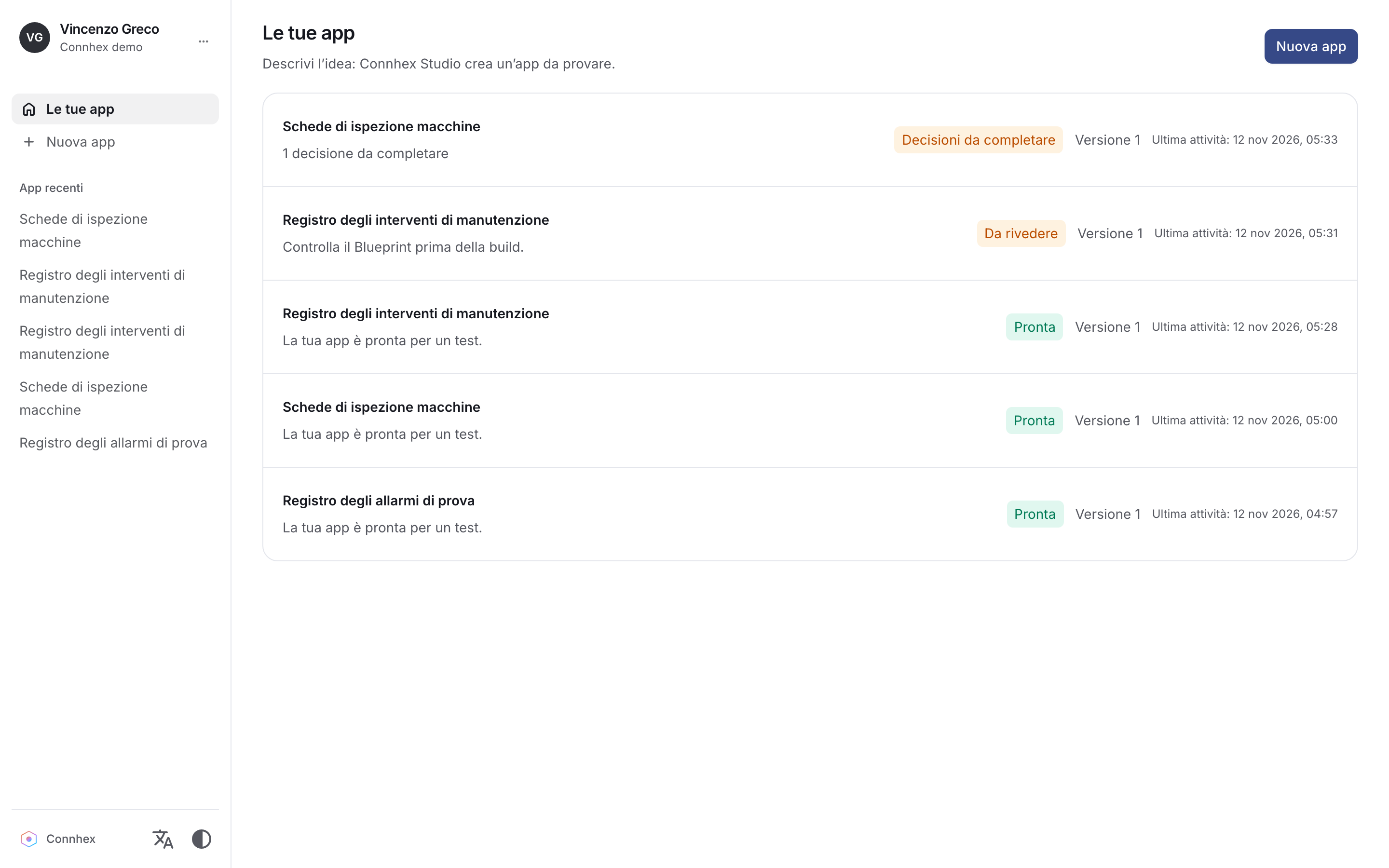
From idea to test drive
A clear path, with you at the decision points.
Studio develops the specification with you, binds the build to the version you approve and brings the result into an integrated preview. Feedback feeds back into the same controlled process.
Describe the need
Explain the audience, the data and the work the app must support. Add reference documents or approved application data.
Decide and approve
Answer focused questions, review the Blueprint and approve the exact version that will guide the build.
Build and check
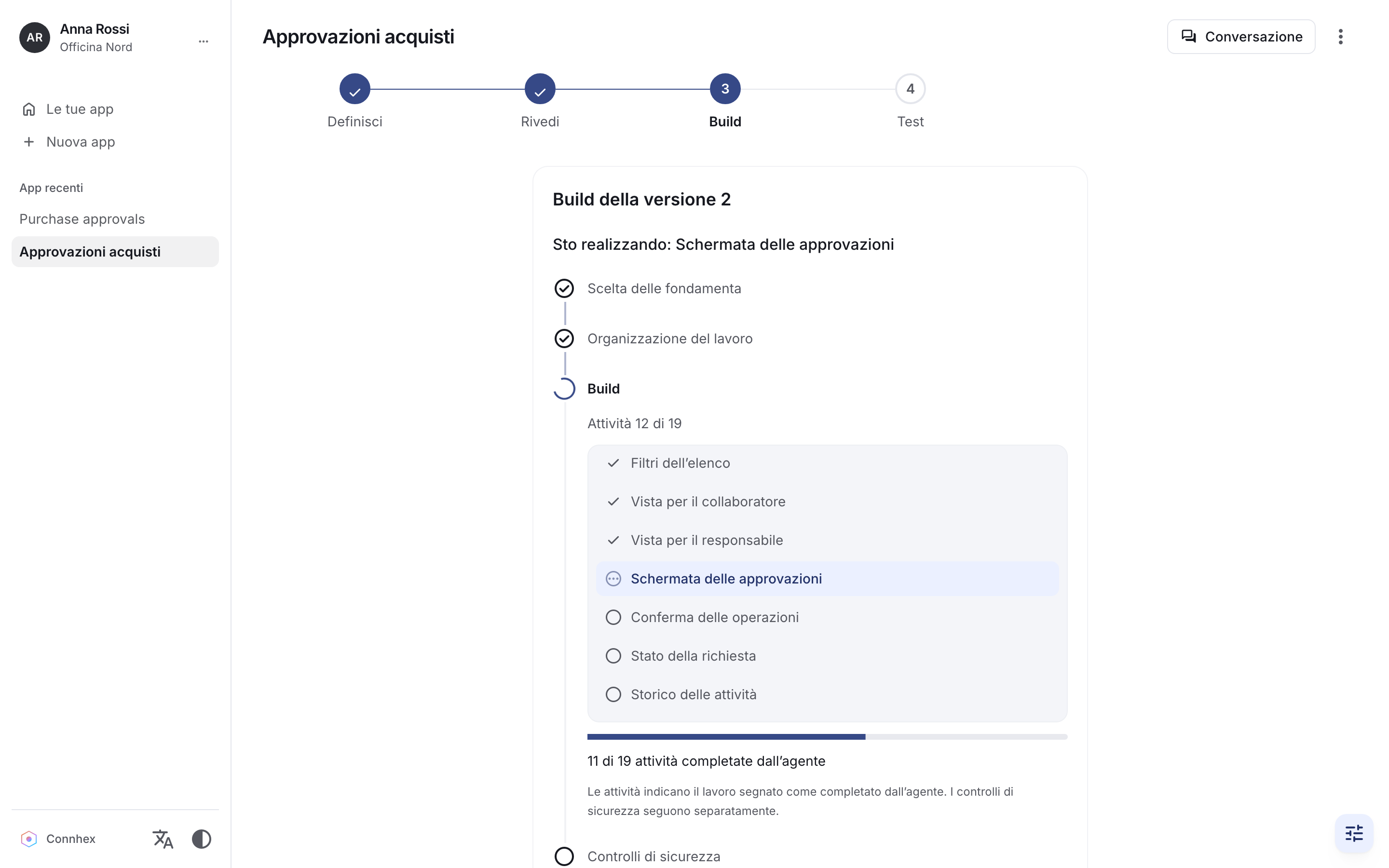
The agent plans and implements. Studio checks the source, runs its validation pipeline and observes supported behavior independently.
Test and refine
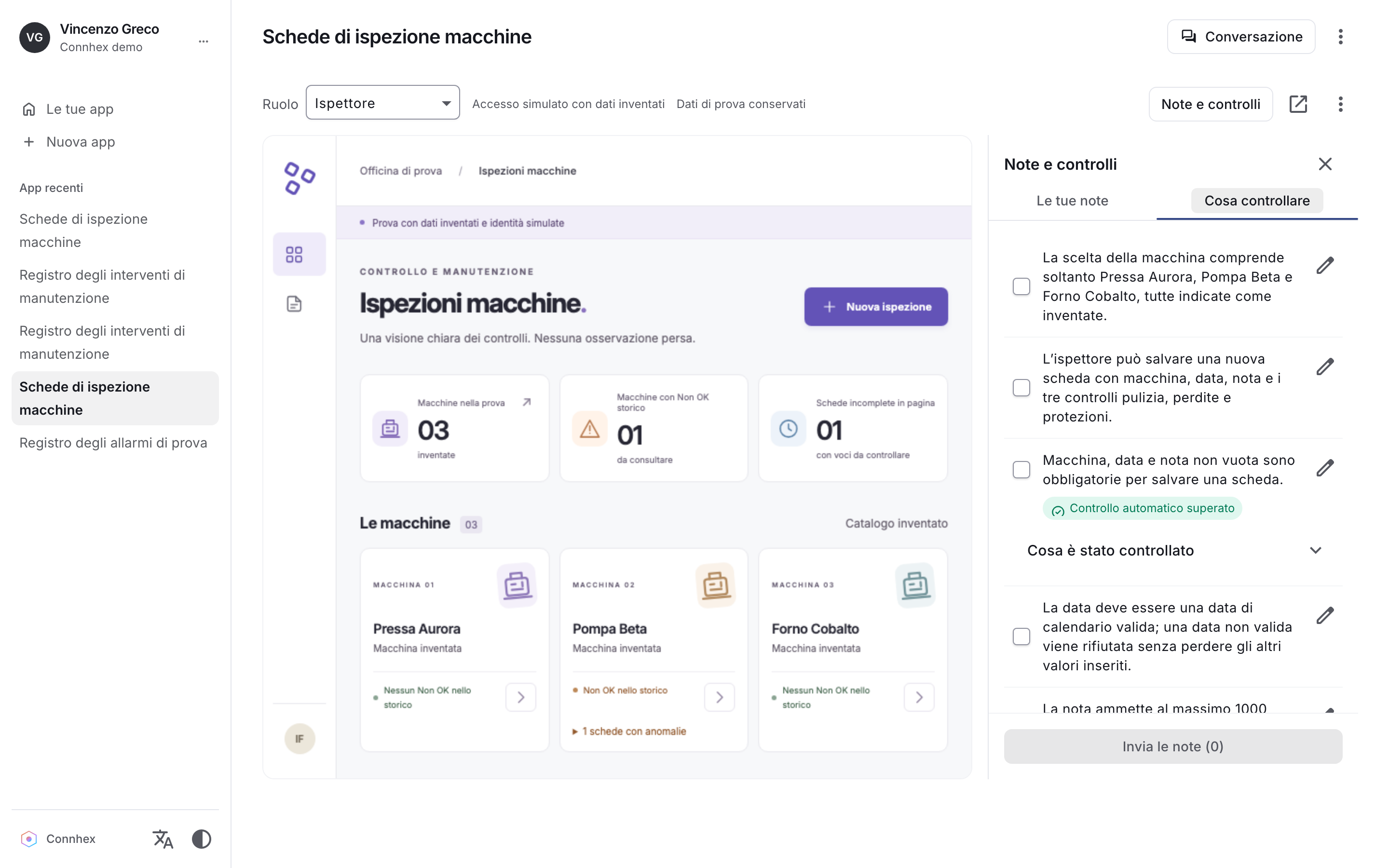
Use an isolated local preview, try fictional roles and report defects or changes against the accepted requirements.
Define before you build
A Blueprint you can understand, question and approve.
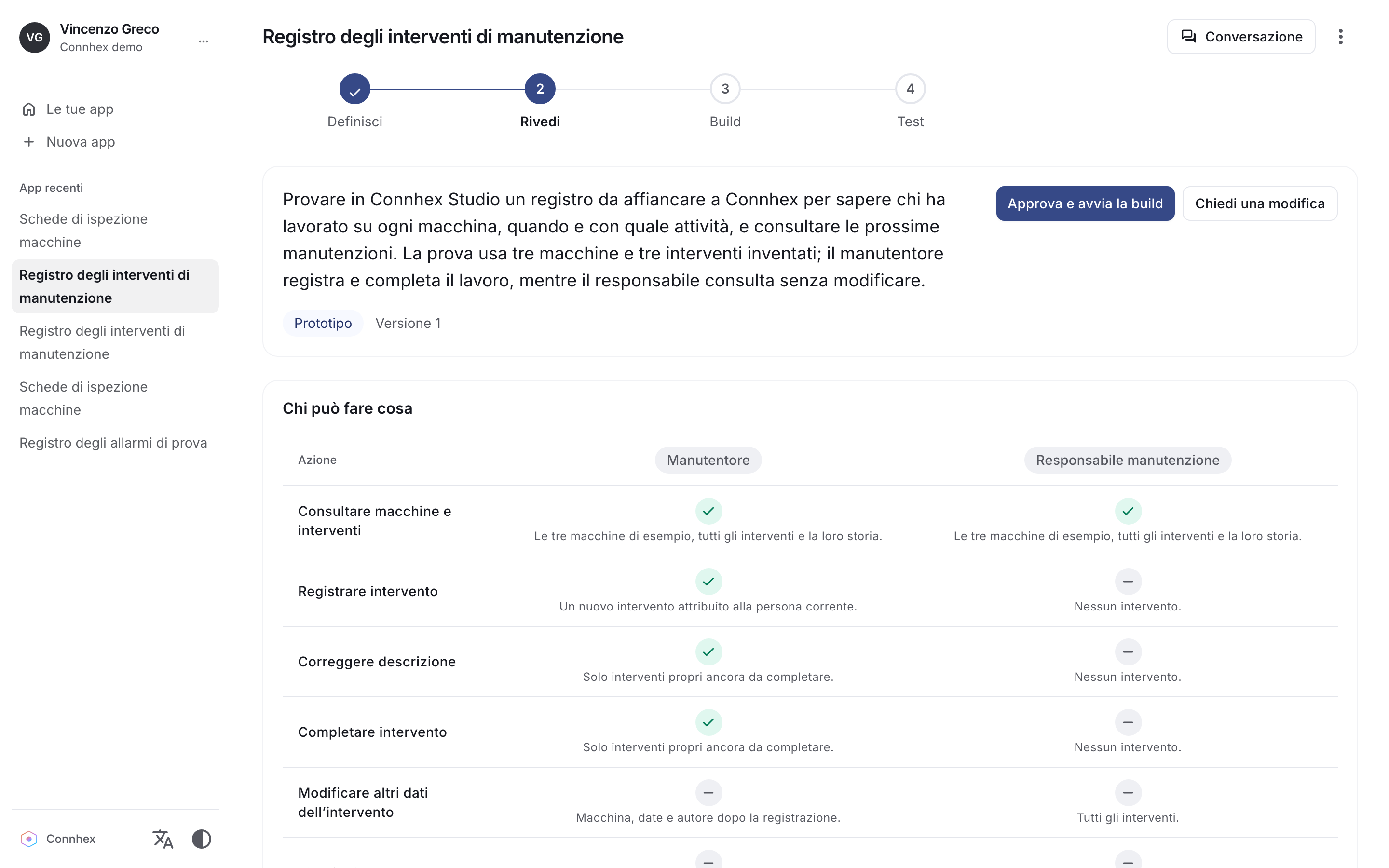
Studio turns your idea into a clear specification, asking focused questions about your users, workflows and data. Review what will be built without writing a technical specification yourself.
Get recommendations, delegate preferences and resolve missing requirements. Studio keeps track of your decisions so you can refine and approve the Blueprint before the build starts.
Decisions and accepted versions stay linked to build attempts and validation evidence, preserving the context behind each result as your application evolves.
- Versioned Blueprints
- Explicit approval
- Requirement changes
- Decision history
Guardrails throughout the build
Built with rules. Checked at every step.
Behind a simple interface, Studio checks the specification, guides the engineering work and controls how your material is used.
Before a build starts, Studio checks the specification’s structure, references and decision history. The Blueprint and specification are stored together as an immutable pair, so the build stays tied to the version you accepted.
Engineering instructions and resources are protected and checked for changes. Design and repair cycles have explicit limits, and failed replacements preserve the previous publication or passing build.
Checked specifications
Structure, references and decisions checked before publication.
Protected resources
Engineering instructions checked for integrity throughout the build.
Bounded repairs
Explicit work limits and fixed acceptance criteria.
Previous results preserved
Failed replacements keep the last accepted result.
A protected engineering constitution tells the agent what it must address while planning, implementing and reviewing your app. It brings security, business integrity and usability into the work even when your initial request focuses on the business outcome.
When relevant, Studio introduces domain-specific concerns into the specification and checks: who can approve, how duplicate financial effects are avoided, what happens to invalid imports and whether a report can be trusted.
These modules guide the requirements to discuss and the checks to define. They do not automatically implement protections or establish regulatory compliance.
Access and inputs
Server-side permissions, input validation and safe output.
Business integrity
Auditable changes, atomic writes and safe retries.
Usability and recovery
Clear errors, recovery actions and accessibility requirements.
Testable logic
Separated business rules and repeatable requirement checks.
- Access and roles
- Personal data
- Approvals
- Data integrity
- Imports
- Reporting
Uploaded files have a declared purpose: reference material to inform the specification, or approved data for the application. Studio stores bounded, hashed uploads and keeps them immutable once referenced.
Only approved application data enters managed assets, with integrity checks. Documents are stored without execution, and agent instructions prohibit running embedded scripts or following links and local paths found inside them.
Approved assets
Only approved application data enters managed assets.
Untrusted documents
Uploads are stored without executing their contents.
Internal-reference checks
Known internal artifacts filtered from specifications and display content.
Controlled execution
The coding agent and the app run within separate boundaries.
Provider-specific policies constrain the agent’s workspace, tools, configuration, network access and inherited environment. Protected resources, uploaded material, managed assets and identity adapters cannot be freely rewritten.
Generated application code and tests run separately in containers. Validation uses fresh offline containers with read-only host mounts, restricted privileges, resource and execution limits, bounded output and disposable databases.
A supported stack with a defined runtime contract.
The agent chooses a supported stack with an application-specific reason. Studio defines the dependencies and runtime contracts; generated projects cannot add arbitrary packages, scripts, lockfiles or tool configurations.






A build has to pass the checks
The app cannot write its own acceptance rules.
Planning creates tasks and links tests to the exact requirements, rules and scenarios you accepted. Studio checks those references and coverage classifications, then runs fixed validation commands that generated projects cannot replace.
Before execution, source checks inspect required entry points, permitted files, the database contract, identity adapter integrity, executable tests and the test manifest. Unfinished task markers block validation.
Type checks
TypeScript compilation checks and strict mypy checks for Python backends.
Tests
Generated behavior tests run through fixed Node or pytest commands.
Bundle
Frontend and backend packaging runs through service-owned build commands.
Smoke check
The frontend shell and bundle are checked, along with the expected response from the application health endpoint.
An independent look at behavior
Evidence beyond the tests the agent wrote.
For supported scenarios, a separate trusted observer exercises the application through its ordinary APIs. Its expectations come from accepted specification facts and stay frozen across repairs. The generated app does not write the observer’s evidence report.
Current observations cover rejection of omitted required input without creating a record, and explicit boolean or choice-state transitions. Checks use distinct fictional records, fresh reads and fresh app/database state to inspect the intended effect and effects on other records.
Observation evidence is linked to the exact accepted specification, source, bundle, runtime image and check definitions. The interface can show passed, partial or failed observations.
Three layers of assurance.
Studio keeps three kinds of assurance distinct, so you can assess the work with the right expectations.
Engineering requirements
What the agent is instructed to implement and test: permissions, data integrity, accessibility and other application requirements.
Enforced gates
What Studio checks before accepting a specification or build: structural integrity, protected resources and its fixed validation pipeline.
Observed behavior
Specific supported behavior exercised independently at runtime, with evidence tied to the exact build.
Integrated, isolated local previews
Preview your app directly in Studio.
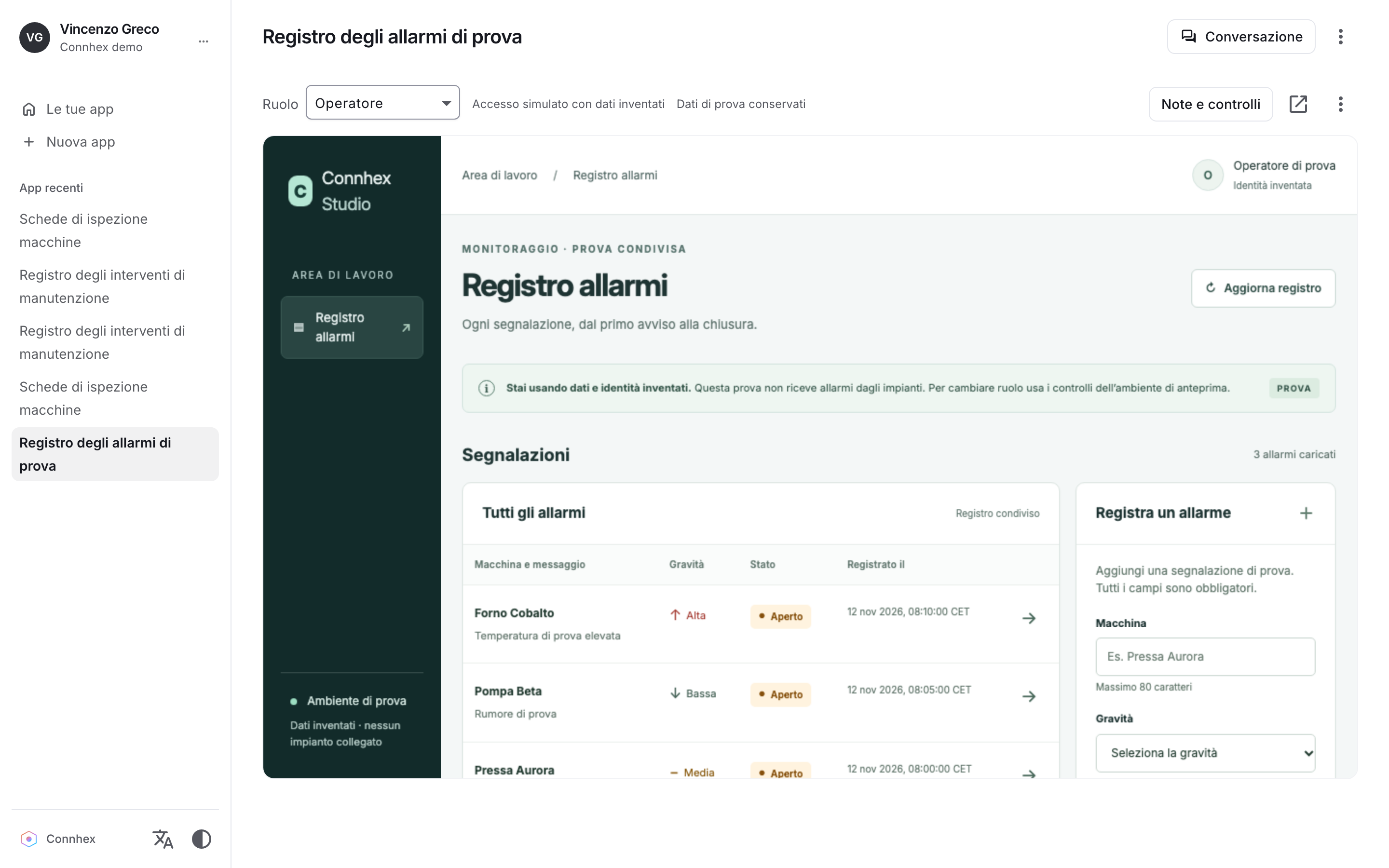
Start a ready build directly in Studio or open its local preview separately. The generated app has no network interface of its own; a trusted local gateway exposes it on loopback and applies browser security controls.
Switch between fictional roles while keeping the application’s data. The gateway removes browser credentials and supplied identity headers before injecting the simulated role and subject, letting you explore role-dependent behavior without using production identities.
Preview data survives preview and service restarts. Compatible schemas reuse the existing SQLite data; incompatible schemas require your explicit consent to reset it. Validation and observer checks always use separate disposable databases.
Human testing is part of the process
Test the result. Keep changes deliberate.
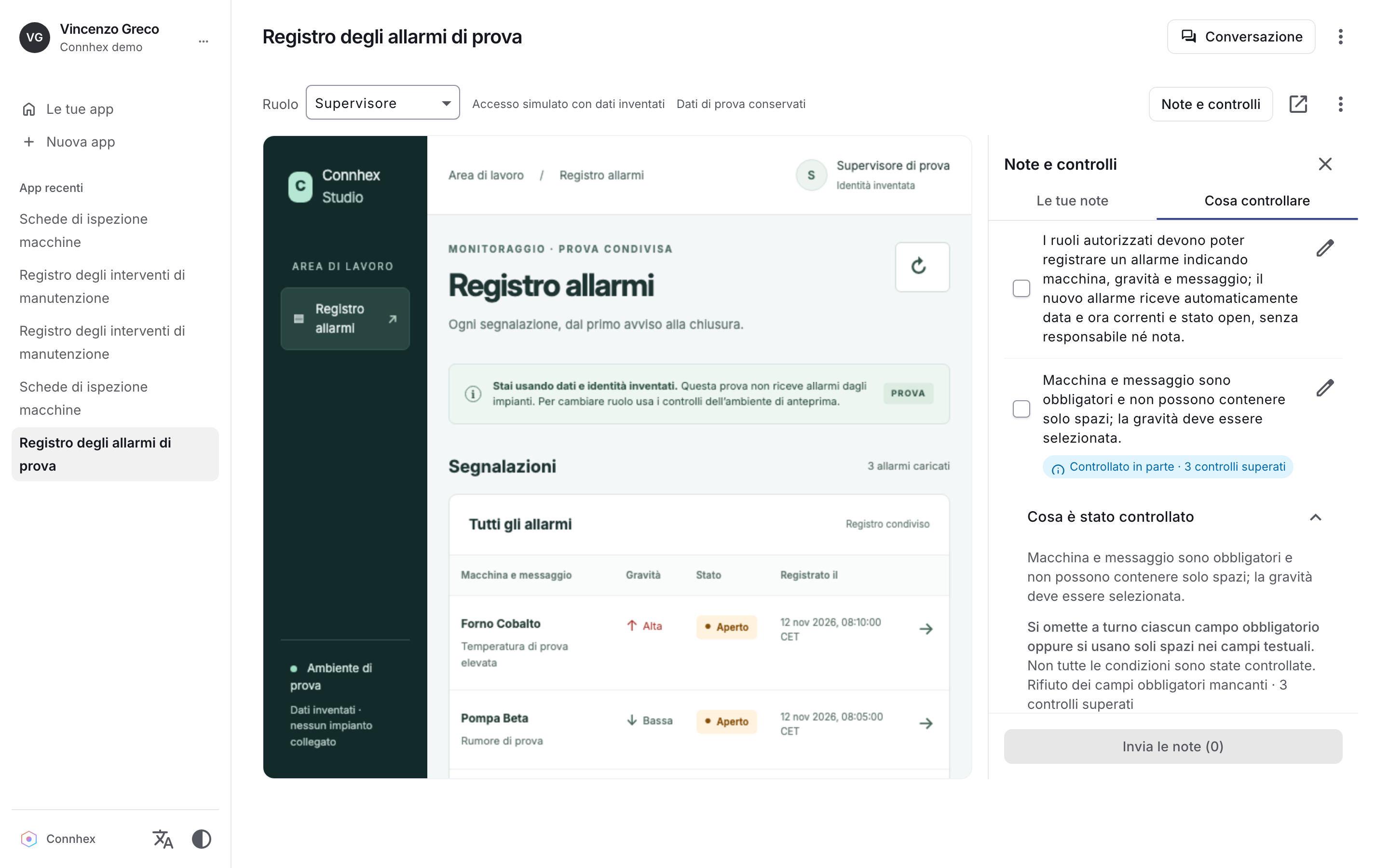
The test drive puts accepted rules into a manual checklist alongside the automated evidence available for the build. You can try the work that matters to your users and report what needs attention.
A defect returns to the accepted requirements
A defect report starts repair from the source you tested, the existing plan and tasks, and the accepted specification. Outstanding reports travel forward until a build carrying them passes validation.
A new requirement returns to design
Changing what the app should do reopens specification review. The new requirement is discussed and approved through the Blueprint rather than silently added during implementation.
Works with your coding agent
Bring the agent you already use.
Connhex Studio works with Claude Code, OpenAI Codex and OpenCode on your computer, using your existing subscription. Studio adds a guided specification process, approval controls, validation and an integrated local preview around the agent you already work with.
You bring the knowledge of your industry, users and workflows. Connhex provides the infrastructure for connected products, and Studio helps your agent build the application around your business: a service portal, an operations dashboard or a tool specific to your sector.
 Claude Code
 OpenAI Codex
 OpenCode