Intro
You don't need Connhex Edge to use Connhex. Your devices can connect directly through Connhex's supported communication protocols and APIs. Connhex Edge is an optional component that adds device-side capabilities when they are useful for your product.
As the name suggests, Connhex Edge is the part of the Connhex that runs on the edge.
It's a lightweight, performant and secure pool of services that can be installed on any Linux-based device. Yes, it can be used to collect data from sensors and send it to the cloud, or to control actuators and other devices: but that's what every other IoT on-device agent does too. Connhex Edge is much more than that.
It includes features that are essential in any production-grade IoT system, such as:
- it integrates with Connhex Cloud from the device production and testing phase
- it manages remote initialization and configuration of devices. It includes support for mutual TLS authentication (mTLS) with per-device X.509 certificates too: if you've ever had to deal with it, you know how painful this can be.
- it handles intermittent connectivity, so you can be sure that your devices will keep working even if they lose connection for a while. And power loss too.
- it includes tools to handle the transition period between your existing MQTT broker and your new infrastructure
- it integrates with Connhex Cloud for automated diagnostics and remote troubleshooting of devices in the field: this includes OTA updates too.
Architecture
Here's a block diagram highlighting the major Connhex Edge components:
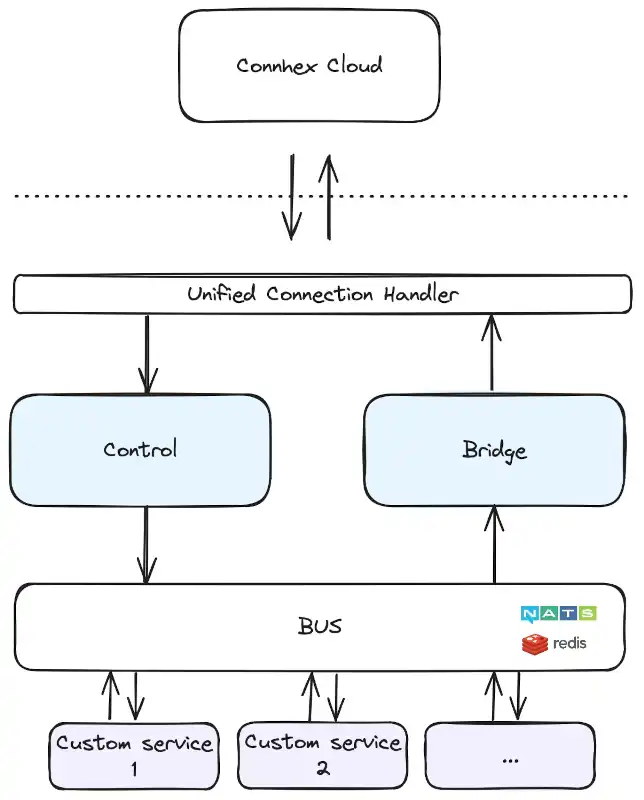
- the communication with Connhex Cloud is managed by a unified connection handler, responsible for ensuring message persistence
- there are two core services: control, responsible for delivering commands from the cloud, and bridge, responsible for transferring data to Connhex Cloud. These are built-in services
- custom services are responsible for implementing application-specific logic: these are your firmware!
- services interact with each other through a shared message bus