Agent package updates
Connhex Edge handles polling, resumable download, integrity checking, extraction, execution and rollback, authenticating with the certificate it enrolled with. You supply a zip archive and a script that does whatever your update needs.
The archive
| File | Contract | |
|---|---|---|
update.sh | Required | Run as root with sh update.sh, working directory set to the extracted archive |
rollback.sh | Recommended | Run the same way if update.sh fails or times out, and after an interrupted update is found at boot |
| Anything else | Optional | Your binaries, assets, migrations. The layout beyond update.sh is yours |
Your script receives four variables:
| Variable | Value |
|---|---|
CHX_OTA_PAYLOAD_DIR | Absolute path of the extracted archive |
CHX_OTA_VERSION_CURRENT | The version the device is on |
CHX_OTA_VERSION_TARGET | The version being installed |
CHX_OTA_TIMEOUT_SEC | How long the script has |
Exit codes
| Exit code | What Connhex records |
|---|---|
0 | Success |
10 | Success, and the agent restarts itself. Use this when you replaced the agent binary or anything it loaded |
| anything else | Failure. rollback.sh runs, the device stays on its current version, and the campaign records the failure |
A timeout counts as a failure.
A minimal package
.
├── update.sh
├── rollback.sh
└── new_service.py
#!/bin/sh
set -e

echo "installing $CHX_OTA_VERSION_TARGET over $CHX_OTA_VERSION_CURRENT"

cp /opt/connhex/custom_services/new_service.py /tmp/new_service.py.bak 2>/dev/null || true
cp ./new_service.py /opt/connhex/custom_services/
systemctl restart my-service

echo "done"
#!/bin/sh
[ -f /tmp/new_service.py.bak ] && cp /tmp/new_service.py.bak /opt/connhex/custom_services/new_service.py
systemctl restart my-service
exit 0
Writing a script that survives the field
Never reboot inside update.sh. A reboot mid-script looks exactly like an interrupted update, and the agent runs your rollback at the next boot. If your update needs a reboot, schedule it for after the script exits and exit 10:
systemd-run --on-active=60s systemctl reboot
exit 10
Stay under the timeout. Ten minutes by default. Raise it on the device's Configuration tab before you ship a slow update, not after.
Make it idempotent. A power cut can mean your script runs twice.
Print progress. Everything the script writes goes to .store/ota/update.log on the device, the first place to look when an update fails.
Agent settings
The OTA settings live under [ota] in agent.toml, and can be changed per device from its Configuration tab.
[ota]
auto_download = true
auto_install = true
check_interval = '1h0m0s'
update_timeout = '10m0s'
| Setting | What it does |
|---|---|
auto_download | Download an update when one is offered |
auto_install | Run it once downloaded. Implies auto_download |
check_interval | How often to poll. Minimum 15 minutes. The agent also checks at startup and whenever it comes back online |
update_timeout | How long update.sh may run |
ignore_pending | Replace an already-downloaded update with a newer one |
A device that downloads an update and does not install it parks there and stops polling. Campaigns cannot move it, and it shows as overdue for as long as it sits. Keep devices whose installs you gate by hand out of campaigns.
Following an update
Each device's Firmware tab shows what it is running on each channel, what it has been offered, and its recent update history.
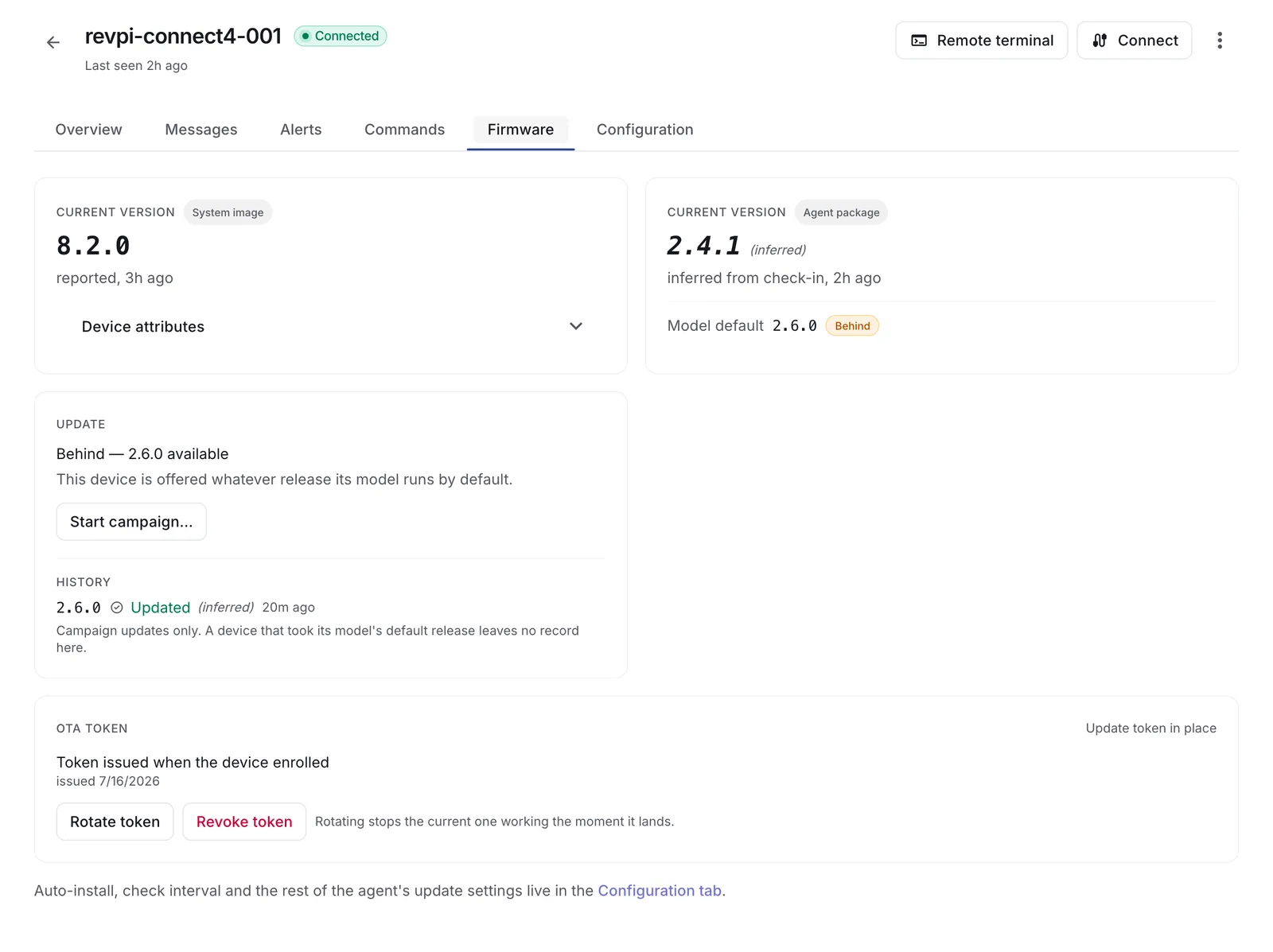
States here are read from the version the device sends at its next check-in, and are labelled inferred. A device that arrives on the target version is recorded as updated. One that keeps arriving on the old version is offered the update again, and recorded as failed once it has had long enough. Campaigns covers the timings.
Flashing an OS image through the agent
update.sh can call anything on the device, swupdate -i included, so an agent package can flash an image. That makes it the answer for a stack with no updater of its own, and the way to deliver the image that first puts SWUpdate on a fleet already running the agent.
What you give up is everything the system image path exists for. The agent runs inside the filesystem being replaced, so it controls no A/B slot, the bootloader arbitrates nothing, and no health check gates the result. The agent records success when your script exits, which is before the new image has proved it can boot.
Four rules keep it out of trouble:
- Raise
update_timeoutwell above the worst-case flash time. The agent kills the script when the timeout expires, and a flash killed mid-write can leave the device unbootable. - Never reboot inside the script. Schedule it and exit
10, as above. A reboot mid-script is indistinguishable from a crash, and the agent runs your rollback against the image you just wrote. - Make
rollback.shanexit 0. Image rollback belongs to the bootloader, and a script that also tries fights it. - Keep the agent's state directory on a partition that survives the swap. The agent reports the version it has on record, so a state directory that goes with the old slot leaves the device with nothing to report, and the release is offered all over again.
For a product that can carry SWUpdate or RAUC, treat this as the bridge to system image updates.