System image updates
Connhex speaks the hawkBit DDI protocol that SWUpdate's Suricatta module talks natively. A device authenticates with either the certificate it enrolled with or its per-device OTA Token. If you already operate a hawkBit server, everything else on the device stays where it is: your images, signing keys, partition layout and boot logic all keep working.
Replace connhex.com with your Connhex domain throughout.
What each side provides
Connhex provides the campaign engine, per-device records, artifact storage with resumable downloads, device authentication, cancellation, and the interface your team watches.
Your image provides the updater and everything around it: the A/B layout, the bootloader logic, the sw-description you author and the keys you sign it with. Connhex never sees or replaces those keys.
Four things are worth confirming before you start:
- SWUpdate built with Suricatta and SSL. SSL is what lets it reach Connhex over HTTPS and verify what it downloads.
- A boot-success check in the new image. With Suricatta, its confirmation is what Connhex records as a successful update. Without one the bootloader falls back and the campaign records a failure.
- Somewhere for
/data/connhex/that your updates leave alone. It holds the device's identity, so an update that replaces it brings the device back as a new one. With A/B slots that means a data partition of its own, outside both root filesystems. - A current system CA bundle. Enrollment and update requests use it to verify the Connhex HTTPS endpoint.
Choosing a device credential
The two DDI credentials are alternatives. Configure one per device.
| Credential | What goes on the request | Use it when |
|---|---|---|
| Client certificate | Mutual TLS with device.key and client.crt; no Authorization header | The device enrolled and can present a certificate. This is the preferred path for new fleets: the updater shares the device's operational identity, renewal and revocation. |
| OTA token | Authorization: TargetToken <ota_token> | A legacy or imported device cannot use a client certificate in its updater. The token is bound to one device and authorizes only its update stream. |
A live certificate is checked on every request. A revoked certificate, or one replaced during renewal, stops working. An OTA token does not expire with the certificate; it works until you rotate or revoke it. Connhex keeps OTA-token creation, rotation, provenance and revocation available for existing devices, so adding certificate authentication does not force a fleet migration. The token value is shown only when it is created or rotated.
The provision token (the one starting with chx1.eyXX...) used at enrollment is not an OTA token. A provision token lets a device join and obtain its identity. An ota_token is issued for one already-created device and can only authenticate update traffic. Do not put a provision token in targettoken or auth_token.
Pointing Suricatta at Connhex
A small fragment holding only identity and connectivity information can be used to integrate Connhex updates in your existing Suricatta config. Everything else about your updater stays in your own swupdate.cfg, which pulls the fragment in:
globals : {
  namespace-vars = "uboot";
  gen-swversions = "/etc/sw-versions";
};

suricatta : {
  polldelay = 300;                        /* your tuning */
  @include "/etc/swupdate/connhex.conf"
};
The namespace-vars setting gives Suricatta persistent bootloader variables for the action id and update state it must report after reboot; use the namespace that matches your bootloader integration. gen-swversions makes SWUpdate record what it installed. Point /etc/sw-versions at a file on the data partition and seed it with the image's initial version on the first boot, so a slot swap does not make the device forget the installed version and accept the same release again.
For a certificate-authenticated device, the fragment written at enrollment is:
tenant = "DEFAULT";
id = "<init_id>";
url = "https://edge.connhex.com/ddi";
sslkey = "/data/connhex/device.key";
sslcert = "/data/connhex/client.crt";
usetokentodwl = true;
sslkey and sslcert point at the certificate the device received when it enrolled.
For an OTA-token device, keep the common values and replace the certificate lines with targettoken:
tenant = "DEFAULT";
id = "<init_id>";
url = "https://edge.connhex.com/ddi";
targettoken = "<ota_token>";
usetokentodwl = true;
The DDI protocol requires a non-empty tenant path segment, but Connhex does not use it to identify or authorize the device. Any non-empty value will do.
Do not set any of the above keys in your own file as well. SWUpdate refuses to start on a duplicate setting.
On a read-only or A/B root filesystem, make /etc/swupdate/connhex.conf a symlink to /data/connhex/connhex.conf. The include path stays at the conventional location compiled into every image, while the actual per-device file lives on the persistent data partition and survives slot swaps.
Connhex shows this per firmware, under Image setup, filled in for your instance.
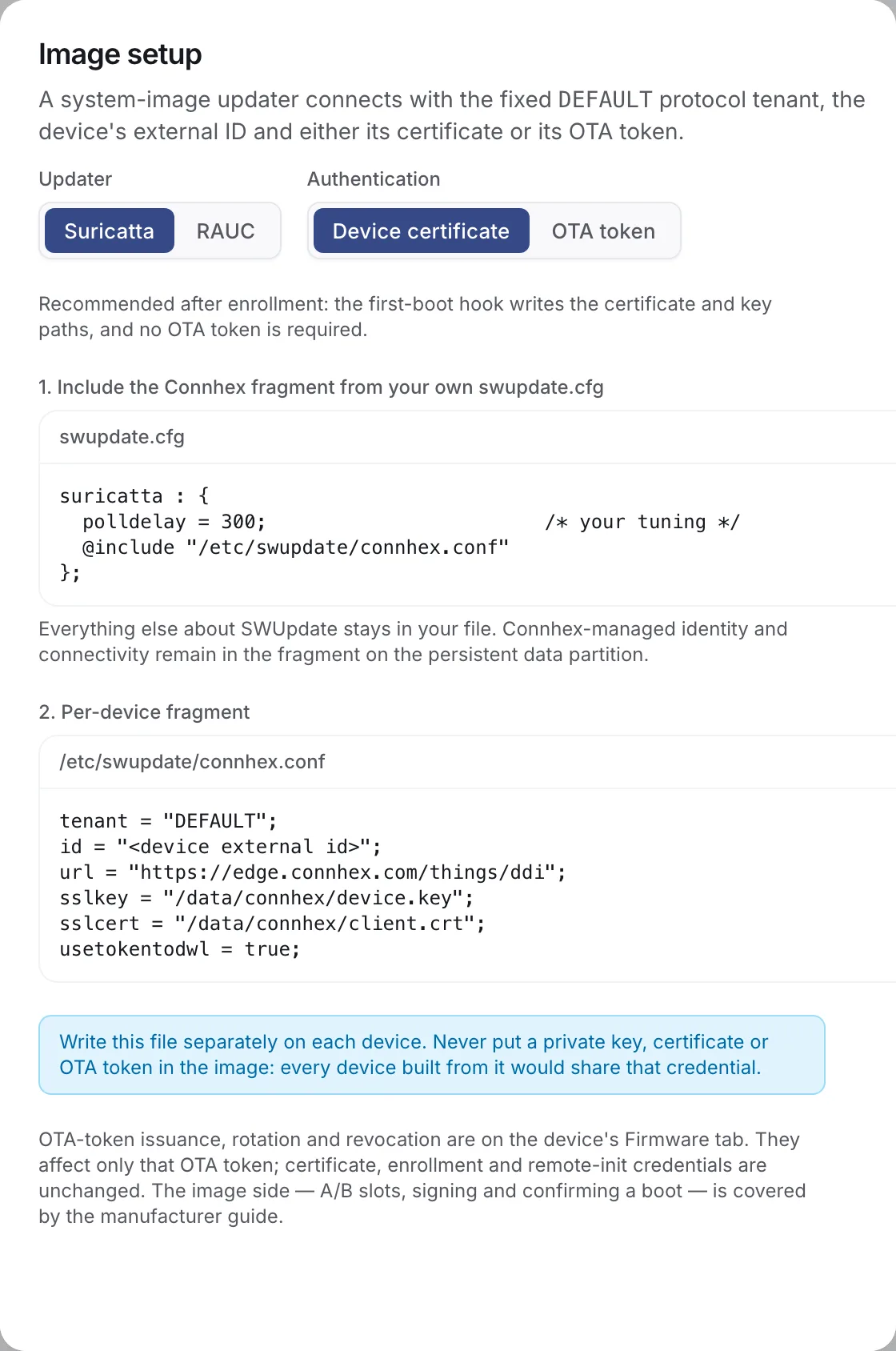
Keep usetokentodwl = true. It makes Suricatta authenticate the artifact download with the configured token or client certificate.
Enrolling agent-less devices
Never put an OTA token or client private key in a shared image: every unit built from it would share one device's identity. Instead the image carries the fleet's provision token, backed by its provisioning-profile claim key, and each device exchanges it on first boot for a certificate of its own.
Two small pieces in the image do that: a one-shot unit that runs at first boot, and a timer that keeps the certificate current afterwards. Both are a few dozen lines of shell over curl, jq and openssl, and the sections below are the parts worth copying.
The first-boot unit
Run it once, after the clock and the network are up, and let it retry while an operator decides:
[Unit]
Description=Enrol this device with Connhex
After=network-online.target
Wants=network-online.target
ConditionPathExists=!/data/connhex/enrolled

[Service]
Type=oneshot
RemainAfterExit=yes
ExecStart=/usr/libexec/connhex/connhex-enroll.sh
# Approval is a person's decision and may take a while. A device that gives up
# waiting tries again later.
Restart=on-failure
RestartSec=15min

[Install]
WantedBy=multi-user.target
The condition is what makes this safe to ship in every image: on a device that already holds credentials the unit never runs, so an image update does not re-enroll anything and a blank device bootstraps itself.
What the script does
The enrollment call itself is the same one any custom firmware makes, and Enrolling your own firmware covers it in full: generate a key, send a signing request with the claim key, poll for approval if you get a 202. What is specific to a SWUpdate device is what happens with the answer.
Store the whole response and the key material under /data/connhex/, then write the fragment from it:
STORE=/data/connhex
umask 077

# The device certificate and its chain, out of the response just stored
jq -er '.client_cert' "$STORE/identity.json" > "$STORE/client.crt"
jq -er '(.ca_chain // .ca_cert)' "$STORE/identity.json" > "$STORE/ca.pem"

# The Suricatta fragment, from the id Connhex assigned
init_id=$(jq -er '.init_id' "$STORE/identity.json")
{
  printf 'tenant = "DEFAULT";\n'
  printf 'id = "%s";\n' "$init_id"
  printf 'url = "https://edge.connhex.com/ddi";\n'
  printf 'sslkey = "%s/device.key";\n' "$STORE"
  printf 'sslcert = "%s/client.crt";\n' "$STORE"
  printf 'usetokentodwl = true;\n'
} > "$STORE/connhex.conf"

chmod 0600 "$STORE"/*
systemctl enable --now swupdate.service
touch "$STORE/enrolled"
That is the shape, trimmed for reading. In the real script, write through temporary files and rename into place, so a power cut mid-write leaves the device with its old state instead of half a file. /etc/swupdate/connhex.conf is a symlink into the store, created when you build the image.
Keep the enrollment credential in a root-only file sourced by the script. Retain it so a device with an expired certificate can enroll again; it never goes into the updater configuration. Build the /etc/swupdate/connhex.conf symlink into the image and leave swupdate.service disabled until the first-boot unit has written its target.
Renewing
A certificate that expires unnoticed takes the device off updates until someone visits it. Check on a timer, and renew once a third of the lifetime is left:
not_before=$(date -u -d "$(openssl x509 -in "$CERT" -noout -startdate | cut -d= -f2-)" +%s)
not_after=$(date -u -d "$(openssl x509 -in "$CERT" -noout -enddate | cut -d= -f2-)" +%s)
now=$(date -u +%s)

lifetime=$((not_after - not_before))
elapsed=$((now - not_before))

# Nothing to do while more than a third of the lifetime remains.
[ "$((elapsed * 3))" -lt "$((lifetime * 2))" ] && exit 0
Past that point, generate a fresh key and signing request and post it with the certificate the device still holds, exactly as described under renewal. Replace the key, certificate and chain atomically, then restart the updater so it opens new connections with the new pair. A device whose certificate has already expired cannot renew, so fall back to enrolling again with the provision token.
Fire the timer weekly with a randomized delay of a few hours. Without it, every device built in the same batch would ask on the same day at the same hour.
If your image also runs Connhex Edge
The agent reads the same store, so whichever runs first enrolls and the other adopts what it finds. The device is one device in Connhex, with both update channels on the same certificate.
Legacy devices that use OTA tokens
A board on your desk, a unit built before you added enrollment, or a fleet imported from another server may have no certificate usable by its updater. Create or rotate an OTA token from the device's Firmware tab and put the one-time value in the fragment as targettoken. Existing tokens continue to work, and you can inspect their provenance or revoke them without changing the device's enrollment credential. OTA-token devices do not run the certificate-renewal timer.
The update, step by step
Upload your .swu or RAUC bundle as a release on a system image firmware.
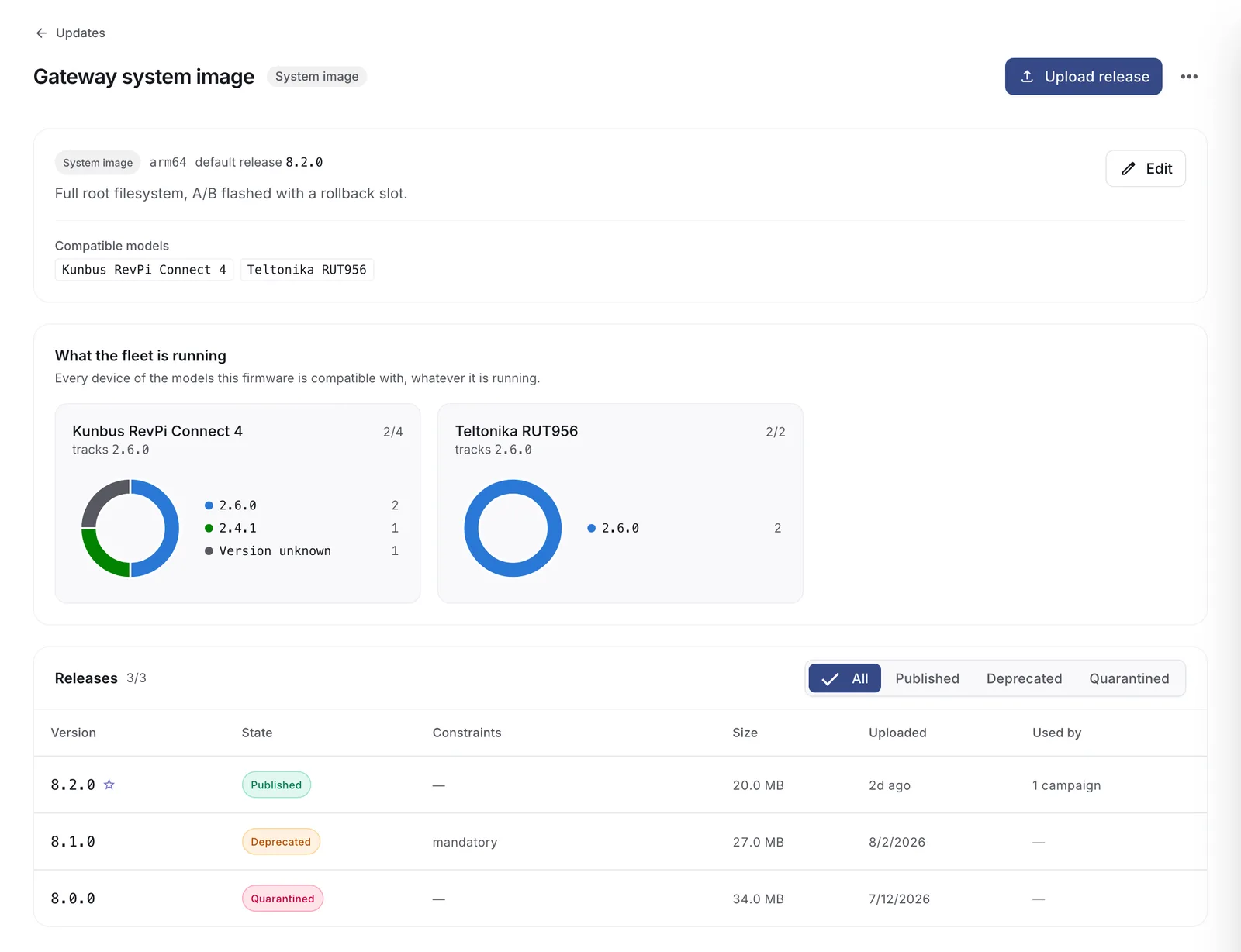
- You start a campaign on that release.
- The device's next poll sees the deployment and streams the image. Interrupted downloads resume where they left off. Connhex shows Downloading.
- SWUpdate verifies your signature and the hardware compatibility, writes the inactive slot and sets the installed-and-testing marker. Connhex shows Installing.
- Your image reboots into the new slot. Connhex shows Restarting, testing new image.
- Your health check confirms, Suricatta reports success, and Connhex shows Updated and records the new version.
A bad flash, a boot loop or a failed health check all end the same way: the bootloader returns to the good slot, Suricatta reports the failure, and Connhex shows Failed with the device's own error text. The device carries on running the old version. If enough devices fail, the campaign stops itself before it reaches the rest of the fleet.
Cancelling a campaign is honored mid-flight. Suricatta notices during a download and aborts cleanly.
Pointing RAUC at Connhex
rauc-hawkbit-updater speaks the same protocol. A certificate-authenticated configuration is:
[client]
hawkbit_server = edge.connhex.com/ddi
tenant_id = DEFAULT
target_name = <init_id>
ssl = true
ssl_verify = true
bundle_download_location = /data/connhex/update.raucb
ssl_key = /data/connhex/device.key
ssl_cert = /data/connhex/client.crt
send_download_authentication = true

[device]
product = <product>
hw_revision = <hardware revision>
installer = rauc-hawkbit-updater
For an OTA-token device, omit both ssl_key and ssl_cert and set:
auth_token = <ota_token>
Do not configure both forms: the updater rejects auth_token together with ssl_key and ssl_cert. Keep send_download_authentication = true so the artifact request uses the configured token or client certificate.
hawkbit_server is a host plus the /ddi prefix, without a scheme; ssl = true selects HTTPS. tenant_id has the same syntactic-only role described above, so DEFAULT can be replaced with any non-empty value.
The example places the generated file and bundle download on /data/connhex/ because the identity must survive A/B swaps and the bundle needs space outside the root slot being updated. Have the same first-boot script render this file from identity.json instead of writing a Suricatta fragment, and start rauc-hawkbit-updater with -c /data/connhex/rauc-hawkbit.conf, either in its service unit or a drop-in. This avoids relying on a root-filesystem configuration that the next image would replace.
rauc-hawkbit-updater uses the system CA bundle; keep ssl_verify = true. It also closes its DDI action as soon as RAUC installation returns, so campaign success does not prove that the new slot completed its first boot. Configure RAUC's boot marking and fallback separately.